Cookies CSS

Thursday, July 14, 2016

AXL issues or high CPU utilization on CallManager after applying Windows update to BOC Server

After applying Microsoft KB3161608, you may experience issues with AXL connecting to CallManager.
Additional symptoms may be high CPU spikes on the CUCM providing AXL services to the BOC server.

There seems to be a known issue in Tomcat which is fixed in a newer versions
https://bz.apache.org/bugzilla/show_bug.cgi?id=52511

Currently, we are recommending the removal of KB3161608 followed by applying any other remaining Microsoft updates.


UPDATE:  KB3172605 appears to replace KB3161608 and has the same issues.


Thursday, June 9, 2016

Manual License Update

If your server is blocked from accessing the internet to update its license there is a manual process to complete it.
Go to the License Update Generator website.  You will need to enter your Product License key and answer the Captcha.
A SQL script will be generated in red at the bottom of the page.
Copy this script to Notepad.

Click here for License Update Generator


Open the BOC Phone System Settings tool.
Choose the Utilities tab -> Database Queries -> Run SQL Query


Paste the SQL Script as shown, and the click Execute SQL Query


After a few moments, the license should reflect correctly in the Phone System Settings tool in the lower right corner.


Wednesday, June 8, 2016

Configure BLOC for Exchange on o365

If you are using Outlook and Exchange as part of Office 365 (o365), you may need to manually configure the Exchange Connection in the settings.
Follow the Exchange Connecting Settings example below.

1.  Uncheck Use Currently Logged In User
     
Leave the EWS Domain empty
2.  Uncheck Use Autodiscover URL
     The EWS URL should be https://outlook.office365.com/EWS/Exchange.asmx
3.  Fill in the EWS User and EWS Password with your o365 email credentials.


Sunday, May 1, 2016

Bridge Operator Console for Cisco - Connector Specs

BOC Connector running in Stand Alone - Recommended Hardware Specs

If you have a single operator install you may choose to run the connector software on the same machine as the client.  If this is the case you may use the recommended hardware specs below as a recommendation, although it may vary given the numbers of phones, activity, and other concurrently running applications on that machine.
Intel i5 Quad Core CPU
4GB of Memory
100GB of Free HD Space (C: Drive)


BOC Connector running on a Server - Recommended Hardware Specs

The BOC Connector is a Windows service that connects to your phone system, and a MS SQL Database.  Here are the suggested build outs.   The roles change based on whether or not you deploy SQL (may need more memory or processor) on box or whether you run the mobile or WIndows client in socket mode.  Additionally, only CUCM 8.5 with update 1 and later have a TSP Driver that supports 64 Bit.  And to compound that, the 32 Bit TSP from Cisco is not supported on a 64 Bit platform (ie, doesn’t work).  So you cannot build out a 64Bit machine in anticipation of a 8.5U1 (or later) rollout and have it work on a pre-8.5U1 CUCM.

Suggested Minimum Server Specifications

Any Windows version supported by the CUCM TSP version (32 or 64 if TAPI Supports it)
Number of Lines
SQL Server
vCPUs
Memory
Storage
NIC
Less than 500
On Box
2
2 GB
100 GB C: Thin
Gigabit min.
Less than 500
Off Box
2
1.5 GB
60 GB C: Thin
Gigabit min
500 - 2500
On Box
2
2 GB
100 GB C: Thin
Gigabit min.
500 - 2500
Off Box
2
2 GB
60 GB C: Thin
Gigabit min.
More than 2500
On Box
2+
2 GB
100 GB C: Thin
Gigabit min.
More than 2500
Off Box
2+
2 GB
60 GB C: Thin
Gigabit min.
* Servers may need additional resources with a high number of users running in socket mode, or in extremely high call volume situations.
Server can be either Physical or Virtual, although we prefer virtual, because it answer all of the high availability questions.  For the OS, you can run all of the latest Microsoft recommended service packs and hotfixes.  If you decide to install SQL Express on the box, there may be some MS required support software that needs to be installed.  Generally speaking, we are not very fussy on what is there as long as it is reasonably current.

Modes of Operation

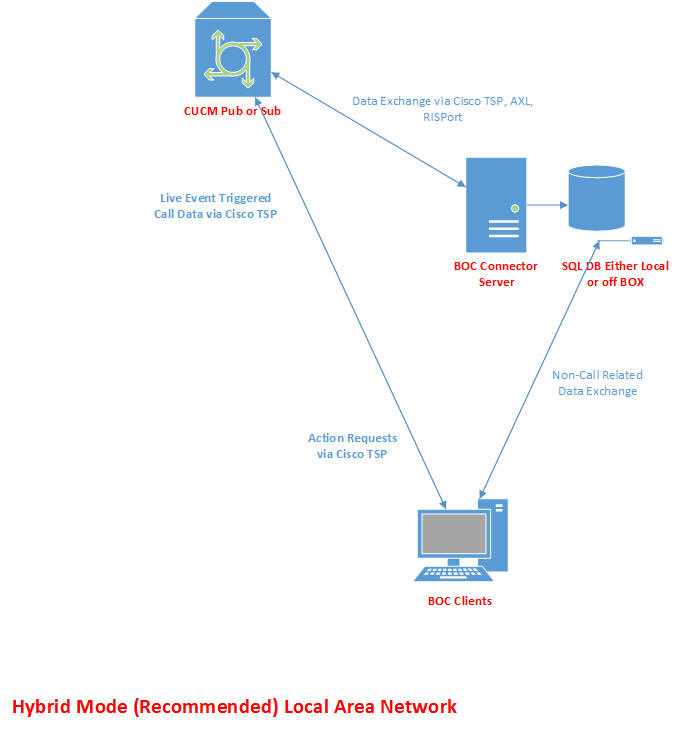
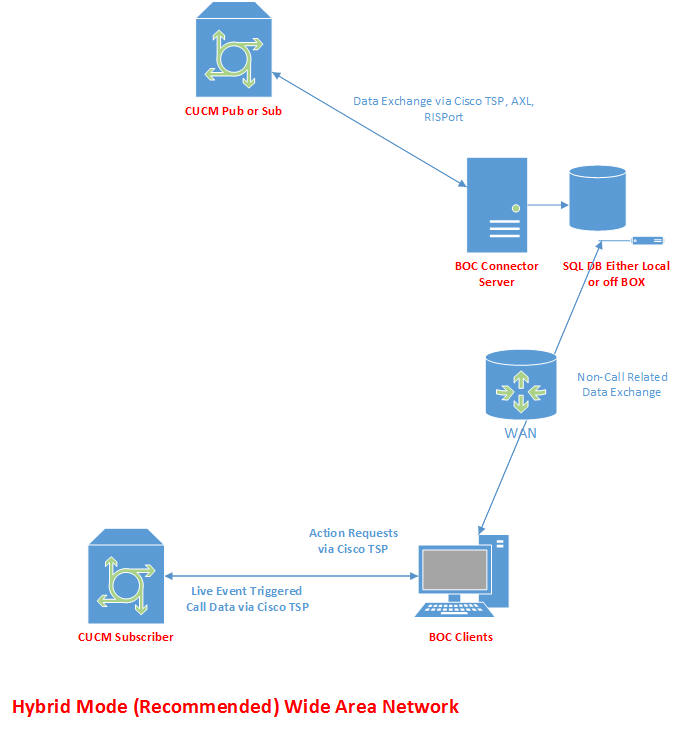
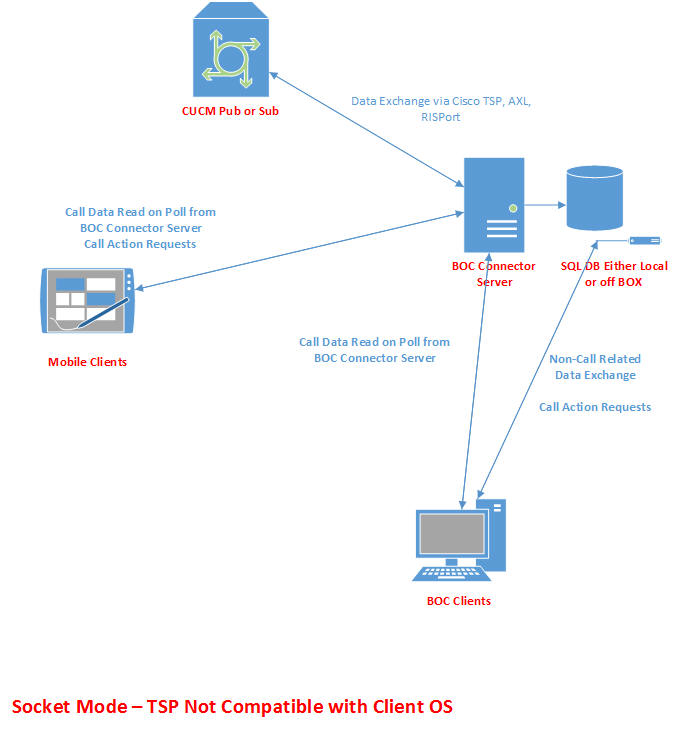
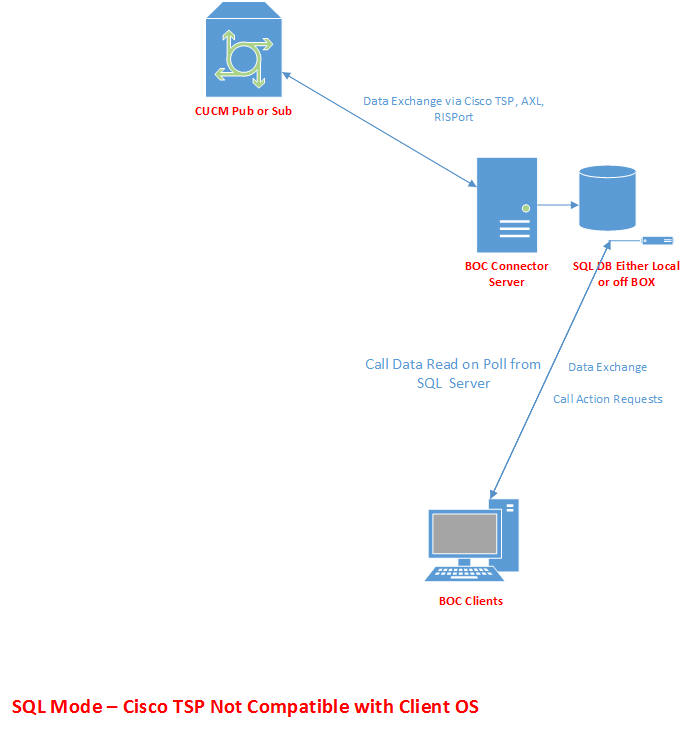
There are 3 modes in which BOC clients can function, Hybrid Mode, Socket Mode, and SQL Mode.  Whenever possible Hybrid Mode is the recommended method for deployment for Windows based PC devices.  All mobile clients will always communicate via Socket Mode, due to no available TSP driver for those platforms.  If you operate a mobile device outside your network, a vpn connection is recommended to ensure secure data transmission.

Bridge Operator Console for Cisco Client Specs

Recommended BOC Client Specs

Bridge Operator Console 3.x for Windows

Win Vista, Win 7, Win 8
.Net 4.5
Quad Core CPU or Better
2GB of Ram or Better

Bridge Operator 2.x for Windows

Win XP SP3, Win Vista, Win 7, Win 8
.Net 3.5 SP1

Dual Core (non Centrino) CPU or Better
2GB of Ram or Better

Bridge Operator Console 1.x for Apple Ipad


IOS 5.0 or Better

Bridge Operator Console 2.x for Android


Android 2.3 or Better

Bridge Communications provides only the recommended hardware specifications, and not any minimums.  The minimum requirements for an organization that has 100 phones, would be dramatically different from one that has 25,000.  In most cases any fairly modern desktop PC will provide adequate power to run our application.   We recommend you always get a 60 day demo key and try the product on your existing hardware before purchasing.

Saturday, April 30, 2016

Supported Operating Systems - Bridge Operator Console for Windows 2.x/3.x for Cisco


Supported Operating Systems - Bridge Operator Console for Windows 2.x/3.x

Below is a matrix of supported client operating systems based on the version of CUCM.
Bridge Operator Console relies on the Cisco TSP driver for it's real time call information and control.
Prior to CUCM 8.5 U1 there was no support for this driver in Windows 7 or any 64 bit OS.  With CUCM 8.5 U1 and
beyond BOC is supported for production in any Windows 7 or 64 bit OS environment.
Testing before CUCM Upgrade
BOC offers a SQL based and Socket based mode when the TSP isn't available, to allow "proof of concept" type testing
where an organization would like to test the features before a CUCM upgrade.  Performance will not be as true as
if the TSP were installed, but should be sufficient on a small scale to determine functionality in your environment.
*Connection speeds and geography can slow performance when the TSP is not available for your OS.

Green = Supported in a Production Environment, Yellow = Supported for Proof of Concept before Upgrading CUCM, Red = Unsupported by Cisco.

TSP Availability Windows XP SP2 32bit Windows XP SP2 64bit Windows Vista 32bit Windows Vista 64bit Windows 7 32bit Windows 7 64bit Windows 8 32bit Windows 8 64bit Windows 8.1 Windows 10
CUCM 6.x
CUCM 7.x
CUCM 8.0
CUCM 8.5
CUCM 8.5 U1
CUCM 8.6
CUCM 9.0
CUCM 9.1
CUCM 10.0
CUCM 10.5
CUCM 11.0
CUCM 11.5


Server Versions Supported

TSP Availability Windows 2008 32 bit Windows 2008 and R2 64 bit Windows 2012 and R2 64 Bit
CUCM 6.x
CUCM 7.x
CUCM 8.0
CUCM 8.5
CUCM 8.5 U1
CUCM 8.6
CUCM 9.0
CUCM 9.1
CUCM 10.0
CUCM 10.5
CUCM 11.0
CUCM 11.5


Monday, January 18, 2016

Extended AD information missing

If you are using some of the more extended AD attributes such as Assistant or Secretary fields, the may not be gathered during a full LDAP build if you are pointing at an AD entry point other than the default at TCP/389.
Some installations require contacting various AD replicas such as a Global Catalog server (GC at TCP/3268) or a Lightweight Directory Service (LDS).  These are not always complete replicas and will not provide the more obscure attributes.  However, it may be possible that they can be added to replicas.  Work with your Active Directory support team as needed.

CTI issues with Park DNs

CallManager allows you to create Park positions in a couple of ways.
The most common is an all numeric numbering plan.
Example:
5000
500[0-9]
500X

However, it is possible to create Park positions with non-numeric characters.
While these can still function as park positions, CallManager will not provide proper CTI information on those positions.  Furthermore, it has been noted that if there are a very large number of these, the Cisco TSP from CallManager 10.5.2 will crash providing no CTI for any DNs.

Examples:
*5000
#5000
*500[0-9]
*500X

Bridge Communication Operator Console only supports all numeric globally unique park DN's.

Friday, October 30, 2015

Active Directory integration with multiple trees in a single forest.

If you have the need to integrate with an Active Directory that comprises of two or more trees in the same forest, certain adjustments will need to be made.
For example:
You have two AD trees.
corp.ndbridge.com represented by DC=corp,DC=ndbridge,DC=com
uk.ndbridge.com represented by DC=corp,DC=ndbridge,DC=com
These trees exist in the forest ndbridge.com


In this case, you will need to point our server at a global catalog server to be able to walk down the necessary trees.  You will see that below denoted by the IP address of the global catalog server and the port the GC is answering on.  TCP 3268 is the default.


Thursday, October 22, 2015

Gathering Lync/Skype Diagnostics

Gathering diagnostics logs will aid in troubleshooting issues.
You may need to turn on some options in the Lync/Skype client for the logs to be created.
Go into your Skype for Business client options and verify the option is chosen.


When you have verified this in in place, re-create the conditions you are trying to capture.

When this is completed, you will need to exit the BLOC console and the Lync\Skype client.
Then open the users APPDATA folder.  You can do this by opening Explorer and typing %APPDATA% into the navigation bar.


Then navigate up one level and then down the Local path until you get to the Tracing folder.
The path will be something like this...
C:\Users\<USERS NAME>\AppData\Local\Microsoft\Office\15.0\Lync\Tracing


The primary file we will need is Lync-UccApi-0.UccApilog.
Your Lync/Skype must be closed or you will not be able to access this file.
Email this file to support@bridgeoc.com with your Customer name in the subject line.

We would also like you to send the Windows Application Event log.
Open Windows Event Viewer.  Navigate to the Windows Logs -> Application
Right click on the Application log and choose Save All Events As
Leave it in EVTX format.
Give it a name and save this somewhere you can retrieve it to email to support@bridgeoc.com as well.


Friday, October 2, 2015

Indexing Active Directory Telephone Number or IP Phone numbers

To install the Active Directory Schema snap-in

  1. Open Command Prompt.
  2. Type:

    regsvr32 schmmgmt.dll

    This command will register Schmmgmt.dll on your computer. For more information about using regsvr32, see Related Topics.
  3. Click Start, click Run, type mmc /a, and then click OK.
  4. On the File menu, click Add/Remove Snap-in, and then click Add.
  5. Under Available Standalone Snap-ins, double-click Active Directory Schema, click Close, and then click OK.

To index an attribute in Active Directory

  1. Open the Active Directory Schema snap-in.
  2. In the console tree, click Attributes.

    Where?

    • Active Directory Schema/Attributes
  3. In the details pane, right-click the attribute that you want to index, and then click Properties.
  4. Click Index this attribute in the Active Directory.

Friday, September 25, 2015

Importing phonebooks or Creating Extension Groups with an import file

You can import data into the My Address Book (MyAB) or Create Extension Groups using the Import Data option.


MyAB
Remember, the MyAB should contain EXTERNAL numbers and not replicate internal extensions.

If you have a Cisco XML address book from the Cisco legacy attendant console, select the version that applies.  If you have a CSV, you can select that option.

A CSV file MUST be in the following format and contain columns for each of the following fields.

Name, Number, Category, Email, Notes
Bob Smith,16125554444,Vendors,bob.smith@acme.com,Board Member
Kevin Smyth,13205553333,Vendors,,,

The Name, Number and Category, MUST contain values. Other empty fields must still have the commas.

When you choose your file, you will be given a chance to review the data before it is imported.  You can select items to be removed from the import.  This does not alter your original data file.

Once an import is completed, you WILL need to relaunch the client for the data to be visible.

Extension Groups
Extension Groups loosely approximates the old Cisco Legacy Speed Dial tabs.  These will be imported as personal Extension Groups visible only to the operator doing the import.